This page contains affiliate links. If you buy through them we may earn a commission at no extra cost to you.

Disclosure: Some links on this page may be affiliate links. If you buy through them we may earn a commission at no extra cost to you. It never changes our verdicts. memorybackup.cloud is independent and not affiliated with any provider named here. Read our affiliate disclosure.
What is the best photo backup drive?
For most people, the best photo backup drive is a portable external hard drive of 2 to 5 TB, because it offers the lowest cost per terabyte for a local copy. Choose a portable SSD if you want speed and durability, or a phone flash drive if you have no computer. Pair any drive with a cloud copy.
A photo backup drive gives you a copy that does not depend on internet, subscriptions or an account. It complements cloud backup rather than replacing it. This page compares the main drive types and explains how to pick one.
| Drive type | Typical sizes | Cost per TB | Speed | Best for |
|---|---|---|---|---|
| Portable hard drive (HDD) | 1 to 5 TB | Lowest | Moderate | Large photo and video libraries |
| Portable SSD | 500 GB to 4 TB | Higher | Very fast | Travel, frequent backups |
| Desktop hard drive | 4 to 20+ TB | Lowest at large sizes | Moderate | Huge archives at home |
| Phone flash drive (USB-C or Lightning) | 64 GB to 1 TB | High | Moderate | Phone-only users |
| NAS | Multi-drive | Higher upfront | Network speed | Families, automatic backups |
How we compared drive types
We compared drive categories rather than single models, because models and prices change monthly. We looked at cost per terabyte, speed, durability, ease of use and how well each fits a 3-2-1 plan. For reliability data, we refer to Backblaze’s public Drive Stats.
Backblaze has published failure rates for the drives in its data centres since 2013. Those are data-centre drives, not portable models, but they show an important truth: every drive fails eventually. Plan to replace backup drives every few years.
Short verdicts
Portable hard drive
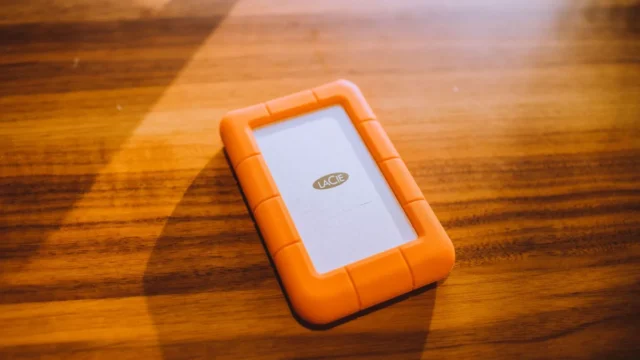
The best value for most photo libraries. A 2 TB or 4 TB portable HDD holds years of photos at low cost. It is slower than an SSD and sensitive to drops, so store it carefully and do not carry it around daily.
Portable SSD
Fast, light and more resistant to knocks, since it has no moving parts. It costs more per terabyte. Choose one if you travel, back up often or edit photos directly from the drive.
Phone flash drive
Plugs straight into a phone and copies the camera roll through an app. Convenient for phone-only users, but small and pricier per gigabyte. See phone backup storage for options.
NAS
A network drive at home that backs up every device automatically. Best for families and photographers, but it needs setup and its own offsite copy. See NAS backup to cloud.
Download our free 3-2-1 checklist and tick off each step as you go. It takes about ten minutes to read and covers phones, computers and cloud accounts.
Send me the checklistWho each drive suits
- Family with a laptop: 2 to 4 TB portable HDD, copied monthly.
- Traveller: portable SSD for trip backups, plus cloud upload at the hotel.
- Phone-only user: phone flash drive, plus Google Photos or iCloud.
- Photographer: two drives in rotation or a NAS. See cloud storage for photographers.
How to choose the right size
Choose a drive at least twice your current photo library size. That leaves room for growth and for keeping more than one dated copy. A 300 GB library needs at least 1 TB, and a 1 TB library needs at least 2 TB.
For a broader comparison including cloud, read backup storage devices and external storage vs cloud.
How to use a photo backup drive safely
- Encrypt the drive with BitLocker on Windows or FileVault on a Mac.
- Copy photos into folders by year and month.
- Eject safely and unplug after each backup.
- Store it away from your computer, ideally in another room or building.
- Open a few files every quarter to confirm they still work.
Step-by-step instructions are in backing up files to an external hard drive. Return to the cloud photo storage hub for the cloud half of your plan.
Frequently asked questions
What is the top pick for a photo backup drive?
For most people, a 2 to 4 TB portable external hard drive is the top pick, because it gives the lowest cost per terabyte and enough room for years of photos. Choose a portable SSD instead if you travel often or want faster, more durable storage.
How did you compare photo backup drives?
We compared drive types on cost per terabyte, speed, durability, ease of use and fit with a 3-2-1 backup plan. We used public reliability research such as Backblaze Drive Stats for context. We compared categories rather than single models, because models and prices change often.
Which option suits most people?
A portable hard drive copied once a month, combined with automatic cloud photo backup, suits most people. The cloud handles daily protection and the drive gives a cheap offline copy. Phone-only users can swap the drive for a phone flash drive.
How long do external drives last?
There is no fixed lifespan, but many drives give years of service while some fail early. Backblaze’s Drive Stats show failure rates rising with age. Replace backup drives every few years, check them quarterly and always keep a second copy in the cloud.
Is an SSD or HDD better for photo backup?
An HDD is cheaper per terabyte and fine for monthly backups kept at home. An SSD is faster, lighter and handles knocks better, which suits travel. For long-term storage, both work if you check them regularly and keep another copy.
Our Start Here guide shows the three steps every setup needs, in plain English. Cannot find a guide for your phone, app or drive? Request a guide and we will write it.
Start hereSources